How to join ZeroTier network from Windows XP on VM
- a ZeroTier network
- a server on ZeroTier client
- a host (win10 or ubuntu/mint) on ZeroTier client
- a guest (virtualbox windows XP)
- The laptop host and server are on ZT pool (10.147.18.0/24)
- home network (192.168.1.0/24).
Install by going here
HOW TO CONFIGURE THE SERVER

join a host ZT as 10.147.18.20In ZT central: allow Ethernet Bridging
Settings > Network > Adapter 1 is NAT (you can choose bridged adapter > physical adapter)

=====NOT USED ANYMORE
Settings > Network > Adapter 2 is Bridged Adapter to ZeroTier

=====NOT USED ANYMORE
=====NOT USED ANYMOREConfigure the LAN connection 2 (ZT) manually


subnet 255.255.255.0default gateway emptyDNS server: empty

ping 10.147.18.10 from laptop VM (10.147.18.21)remote desktop to 10.147.18.30 from laptop vmmap to server net use x: \\10.147.18.10\SHARED from laptop vm
This might be useful to connect e.g. Windows XP to ZeroTier network or other machines which you can't or don't want to install ZeroTier client to.
Create ZeroTier network in control panel and join it on your host
Allow Ethernet bridging for your host in control panel
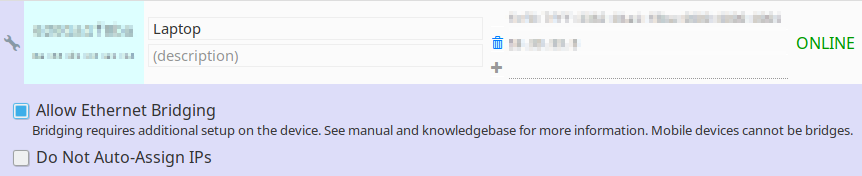
In VM network settings, add second network adapter: bridge.
Connect it to your ZeroTier network interface (e.g.
zt0)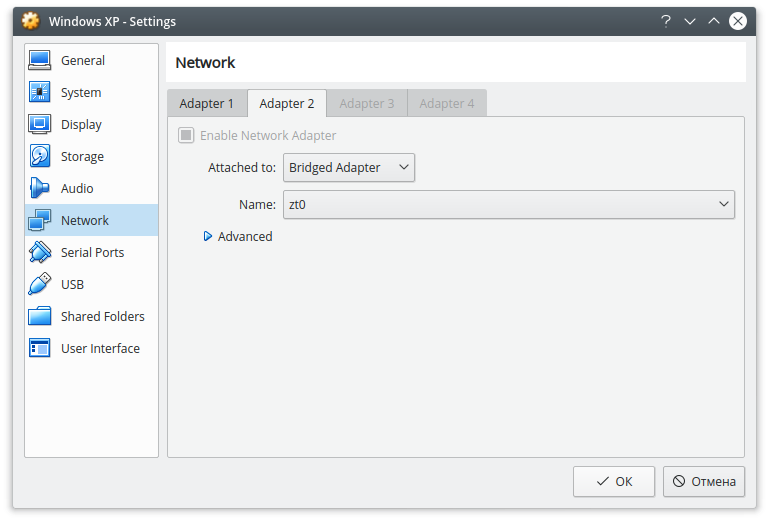
In your VM, configure network manually (e.g. if your ZeroTier network is
10.147.17.0/24, set IP in that range)Done! It won't show up in Control panel, but now your VM is part of your ZeroTier network.
Easy way of bridging lan for remote access

I've read a bunch of posts on how to bridge lans and I find it stupid that they want you to have two interfaces, create a bridge with brctl, setup routes in every router, etc and it never seems to work or be intuitive.
So, here's how to do it simply. You need one nic on the box you want to bridge your lan with. This is from a fresh network, you'll go in and add your two boxes and then go and set a route in the zerotier web config for your bridged lan -> the ip zerotier gives you on the lan bridge box.
For example, I have a zerotier box of 10.0.0.10 as my laptop, and another of 10.0.0.20. I've authorized both and validated they can ping each other. The lan network at my home is 192.168.1.0/24. So on the configuration page in the top right I add '192.168.1.0/24' as the 'network/bits' and '10.0.0.20' where it says (LAN).
You need to ensure that your bridge box has ip forwarding enabled. You can add net.ipv4.ip_forward = 1 to /etc/sysctl.conf on ubuntu and other systems and then run sysctl -p to reload the config.
You should now be able to ping the local, non-zerotier, IP of your bridge box but not the rest of your network. This is because the rest of your network still sees the packets as originating from something other than your lan which it doesn't know how to route to. To fix this you use an iptables masquerade rule.
On the bridge box you'll need your zerotier nic name and your local lan's nic name. Run ifconfig to see both.
My lan nic is named ens18 and my zerotier nic is named zt2lr2wzdx. Replace your two nics with what I have and run the following commands on your bridge box.
iptables -t nat -A POSTROUTING -o ens18 -j MASQUERADE
iptables -A FORWARD -i ens18 -o zt2lr2wzdx -m state --state RELATED,ESTABLISHED -j ACCEPT
iptables -A FORWARD -i zt2lr2wzdx -o ens18 -j ACCEPT
If you run a tcpdump -i ens18 icmp replacing your lan nic on any other box you have inside your lan you'll now see the pings originating from your bridge box and handling the nat for you.
You should now be able to access everything in your home lan and have the routes pushed to your zerotier clients. If the routes do not show up with a netstat -rn make sure you have allowManaged=1 in your /var/lib/zerotier-one/networks.d/###.local.conf file or whatever is respective to your system. In OSX/Windows you can select that in the GUI.
You can rinse and repeat this for any other networks you want to add as well.
https://www.reddit.com/r/zerotier/comments/a24w4p/how_to_create_lan_bridge_for_someone_not_network/
https://gist.github.com/laduke/98406c2eb86644901c24a453736e4014
This guide should help you out. I do something similar to this. I have a VM that runs on my home network, and I run a zerotier "router" in that VM. Whenever I need access to my full network, this is what I use.
More information here too.
https://www.reddit.com/r/zerotier/comments/9714a2/easy_way_of_bridging_lan_for_remote_access/
I was listening to a recent Packet Pushers Priority Queue podcast called Meet ZeroTier – Open Source Networking and decided to give ZeroTier a go, to see if it really worked as described. TL;DR: Yes it really does work as described! If you’re unfamiliar with ZeroTier I highly recommend listening to this podcast to understand why, what and how. If you’re unsure on the why, what and how, this blog post probably isn’t for you (yet!).
One of the obvious issues with ZeroTier is that for devices to talk to each other, they need a ZeroTier client installed. For laptops, mobile devices and even some NAS devices this isn’t a problem because there are clients in existence already. But what about using ZeroTier to extend an entire Layer 2 network? This is what the ZeroTier Edge device will do but it is entirely possible to configure a Linux host as an edge gateway device to do exactly this.
The following notes are based on a Linux host running Debian 8 and some of the notes will be specific to Debian and other such derivatives (e.g. Ubuntu).
If you’ve not done so already start by installing the Linux ZeroTier client. ZeroTier have also made this stupidly easy to do (ensure you have curl and gpg installed):
curl -s 'https://pgp.mit.edu/pks/lookup?op=get&search=0x1657198823E52A61' | gpg --import && \ if z=$(curl -s 'https://install.zerotier.com/' | gpg); then echo "$z" | sudo bash; fi
Now install the Linux bridge utilities:
apt-get install bridge-utils
Edit the network configuration (/etc/network/interfaces ) to bridge the Ethernet adapter and ZeroTier adapter together, giving the bridge interface (br0) the IP configuration from the Ethernet adapter. For example:
auto eth0
iface eth0 inet manual

auto br0
iface br0 inet static
        address 192.168.0.3
        netmask 255.255.255.0
        network 192.168.0.0
        broadcast 192.168.0.255
        gateway 192.168.0.254
        dns-nameservers 127.0.0.1
        dns-search home.lan
        bridge_ports eth0 zt0
        bridge_fd 0
        bridge_maxage 0
post-up echo 1 > /proc/sys/net/ipv4/ip_forwardNote: The post-up directive is only required if you have other Layer 3 routable networks on your LAN. If you don’t, you don’t need this.
One gotchya is that the network service will start before the ZeroTier service meaning that the zt0 interface will not be present when the bridge interface is formed. A quick and dirty way around this is to add an entry to root’s crontab (sudo crontab -e or edit you could edit /etc/crontab ) to restart networking after a reboot:
@reboot /etc/init.d/networking restart
Next move on to your ZeroTier network. Login to ZeroTier Central. If you’ve not done so already create a new network. Your ZeroTier network wants to use the same Layer 3 addressing as the network you’re bridging to. In my example this means the ZeroTier network will use 192.168.0.0/24 because my LAN is 192.168.0.0/24. Add this in to the Managed Routes section of your ZeroTier network and enable the Auto-Assign from Range option. Select Advanced and in the Auto-Assign Pool, set a range of IPs to assign to your ZeroTier clients that’s not used on your Layer 2 network, e.g. a range of IPs outside of your DHCP scope range so that no IP conflicts arise.
Back on the Linux host, use the zerotier-cli command to request to join the host to your ZeroTier network:
zerotier-cli join <network id>
Note: When the Linux host joins the ZeroTier network it will likely drop off your LAN until all the configuration is completed. Ensure you have console access.
Now edit the /var/lib/zerotier-one/networks.d/<network id>.local.conf file and set allowManaged to 0.
On ZeroTier Central the host should now appear as a Member of your network and will need to be authorised to join it. In addition you’ll need to edit the properties of this member and enable Allow Ethernet Bridging and Do Not Auto-Assign IPs. Delete any IPs associated with the member and set a manual IP. This should be the same IP as used on the br0 interface on the Linux host (in my example this would be 192.168.0.3).
Reboot the Linux host. After it has rebooted you should see br0 is up with the correct IP configured (ifconfig br0 ) and the bridge should contain your Ethernet adapter (eth0 in this example) and the ZeroTier adapter (zt0). Check using brctl show .
If everything is correct your Linux host will be now be acting as an Ethernet (Layer 2) bridge between your LAN and your ZeroTier network. Install tcpdump to see what’s happening (e.g. tcpdump -n -i br0 ‘not host 192.168.0.3’ ) and from another ZeroTier client on your ZeroTier network attempt to access a non-ZeroTier client on your LAN (like your toaster, because you know, everything is IoT now).
If you’ve got other Layer 3 (routable) networks on your LAN you can easily make this accessible from your ZeroTier network simply by adding the network to the Managed Routes section of your ZeroTier network via ZeroTier Central. This requires IP forwarding to be enabled on the Linux bridge so if you removed the post-up directive mentioned earlier, you’ll need to add this back in.
According to the Microsoft forums you can enable IP forwarding (routing) using the following steps:
Go to Start and search on cmd or command. Right click on either cmd or command then select Run as administrator. At the command prompt type regedit. Navigate to the HKEY_LOCAL_MACHINE\SYSTEM\CurrentControlSet\ Services\Tcpip\Parameters\IPEnableRouter setting, right click and select Modify. Change 0 to 1 and exit the editor.
When your back at the command prompt type services.msc and navigate to the Routing and Remote Access service. Right click and select Properties. Change to Automatic and click on Start to start the service.
After this, you will need to set the default gateway of hosts in network A to 10.10.10.34 and the default gateway of hosts in network B to 192.168.0.23. If this isn't doable because you would lose connectivity to the rest of your network (or internet), you can add static routes to hosts in both networks:
For hosts in network B:
route -p ADD 10.0.0.0 MASK 255.0.0.0 192.168.0.23
For hosts in network A:
route -p ADD 192.168.0.0 MASK 255.255.255.0 10.10.10.34
The -p switch is to make them persistent after reboots. You would need to restart after you apply these settings.


lion24 commented on Jul 2, 2018